YouTube Video Search Download · No proxy required

Usage times: 2,927,225 Number of comments: 0
All legends in one place 😭🙏

😂 Get ready to laugh out loud! 😂 Here’s another meme to brighten your day! If this made you chuckle, you’re not alone! Share with your friends and let the laughter spread! 💥 👉 Don’t forget to hit that subscribe button if you want more daily laughs, fun, and viral content! Stay tuned for the best memes out there. 😎🔔 ⚖️ Fair Use Disclaimer: This content is used under fair use for entertainment and educational purposes. All rights to the original content belong to the respective owners. No copyright infringement is intended. #memes #prank #funny #bleach #anime #gta6 #gta

Download Options

Fast download
Tips: Fast requires "Over the Great Firewall" Network
Only show audio

Download List

💥💥💥 Recommended to use IDM, can be accelerated by multiple threads, 🧧IDM software join group top self-pickup.
Quality FPS Format Audio Size Download VIP
1080p60 60 mp4 7MB
1080p60 60 webm 11MB
1080p60 60 mp4 21MB
720p60 60 mp4 5MB
720p60 60 webm 7MB
720p60 60 mp4 12MB
480p 30 mp4 1MB
480p 30 mp4 2MB
480p 30 webm 4MB
480p 30 webm 2MB
480p 30 mp4 3MB
360p 30 mp4 1MB
360p 30 webm 1MB
360p 30 mp4 1MB
240p 30 webm 619KB
240p 30 mp4 577KB
240p 30 mp4 1MB
medium webm 937KB
medium m4a 895KB
medium, DRC m4a 895KB
medium, DRC webm 937KB
low m4a 338KB
low webm 377KB
low webm 489KB
low, DRC webm 488KB
low, DRC webm 376KB
low, DRC m4a 338KB
144p 30 mp4 515KB
❗❗❗ If you click Download to enter the preview page, you can try to right-click the download button to save the link as, right-click to use IDM to download.🧧IDM software join group top self-pickup
❗❗❗ For the problem that the video has no sound, you can download the video and audio separately and use the following methods to solve the problem 👇

Synthesize video and audio(YouTube uses separate video and audio storage)

Method 1: Use paid downloads of synthesized video and audio files

Scan the WeChat QR code to pay 1.99 (not 2.99) download synthesized audio and video files immediately

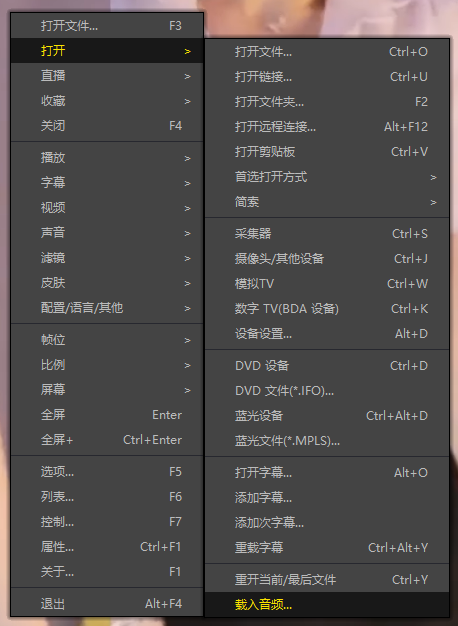
Method 2: Use PotPlayer to combine video and audio playback

Download a video file without sound, and use PotPlayer (https://potplayer.daum.net) to open the video, right click on the playback interface -> Open -> Load External Audio -> File Type select "All Files (*.*)" -> Select the downloaded audio file (for example xxx.weba), now the video has sound, as shown below.
Method 2: Use PotPlayer to combine video and audio playback

Method 3: Use FFmpeg to combine video and audio into one file

ffmpeg -i video.webm -i audio.weba -vcodec copy output.mp4

The synthesized output.mp4 will have sound

FFmpeg Download: https://ffmpeg.org/download.html

Windows: winget install ffmpeg

Mac: https://evermeet.cx/ffmpeg/