
YouTube 视频搜索下载 · 全程无需科学

We do our best to stay hidden playing Meccha Chameleon! Note: After filming this episode, users discovered that some custom maps in Meccha Chameleon were infected with malware. Check for bugs and proceed with caution! Join the Mythical Society for access to never-before-seen footage, exclusive merch, sneak peeks, original series, and much, much more: https://mythic.al/yt-msoc Sign up for Mythical newsletters to stay up to date on all things Mythical and get 10% off your first order at the Mythical Store. Sign up now: https://Mythical.com/Newsletter This is Good Mythical MORE, the show after the show. Watch today's main show, Good Mythical Morning: https://youtu.be/tRPkxmHzgfk Pick up official GMM and Mythical merch at https://mythic.al/yt-store and https://www.amazon.com/mythical Submit your Wheel of Mythicality intro video here: https://mythic.al/GMMWheelVideo Want to send us something? https://mythic.al/contact Get a copy of our novel, The Lost Causes of Bleak Creek @ http://www.bleakcreek.com Check Out Our Other Mythical Channels: Mythical Kitchen: https://youtube.com/mythicalkitchen Rhett & Link’s Wonderhole: https://youtube.com/rhettandlink Good Mythical Morning: https://www.youtube.com/@GoodMythicalMorning Follow Mythical: Instagram: https://instagram.com/mythical Facebook: https://facebook.com/mythical Twitter: https://twitter.com/mythical TikTok: https://tiktok.com/@mythical Website: https://mythical.com GMMore #3086 Intro Motion Graphics by Fantoons https://www.fantoons.shop/
下载选项
下载列表
合成视频和音频(YouTube使用分开的视频和音频存储方式)
方式一:使用付费下载合成好的视频和音频文件
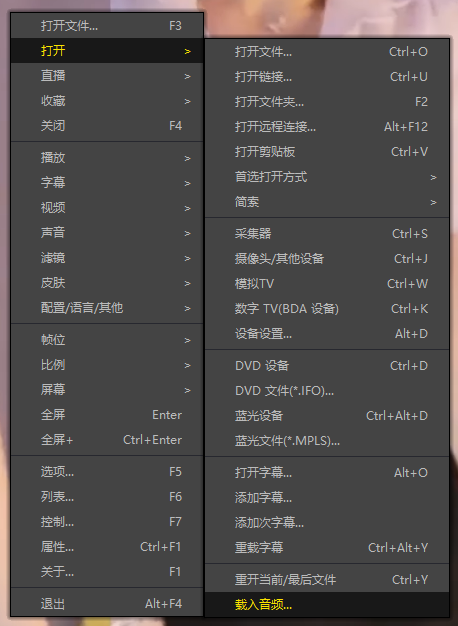
1.99 (原价 方式二:使用 PotPlayer 合并视频音频播放
方式三:使用 FFmpeg 合并视频音频为一个文件
ffmpeg -i video.webm -i audio.weba -vcodec copy output.mp4
合成后的 output.mp4 将是有声音的
FFmpeg Download: https://ffmpeg.org/download.html
Windows: winget install ffmpeg