YouTube 视频搜索下载 · 全程无需科学

总使用次数: 2,876,879 评论总数: 0
Police officer received a threat | The Rookie | #Trending #Shorts

Police officer received a threat | The Rookie | #Trending #Shorts All the videos, songs, images, and graphics used in the video belong to their respective owners and I or this channel don't claim any rights over them. Copyright Disclaimer Under Section 107 of the Copyright Act 1976, allowance is made for fair use for purposes such as news reporting, teaching, scholarship, and research. Fair use is a use permitted by copyright statutes that might otherwise be infringing. Non-profit, educational, or personal use tips the balance in favor of fair use. Hashtags: #therookie #CinematicEdit #AfterEffects #PhonkEdit #FunkEdit #MovieEdit #TrendingNow #ViralShorts #YouTubeShorts #YTShorts #ForYou #emotionalscene #NetflixSeries #EpicScene

下载选项

是否极速下载
注意: 极速需要科学网络
仅显示有音频的行

下载列表

💥💥💥 推荐使用 IDM 下载,可多线程加速,🧧IDM 软件加群置顶自取
质量 帧率 格式 音频 大小 下载 VIP
2160p60 60 mp4 82MB
2160p60 60 webm 162MB
1440p60 60 webm 76MB
1440p60 60 mp4 40MB
1080p60 60 webm 25MB
1080p60 60 mp4 16MB
1080p60 60 mp4 32MB
720p60 60 mp4 10MB
720p60 60 webm 14MB
720p60 60 mp4 19MB
480p 30 mp4 3MB
480p 30 mp4 4MB
480p 30 mp4 2MB
480p 30 webm 5MB
480p 30 webm 2MB
360p 30 webm 1MB
360p 30 mp4 1MB
360p 30 mp4 1MB
360p 30 mp4 3MB
240p 30 mp4 631KB
240p 30 mp4 398KB
240p 30 webm 488KB
medium webm 864KB
medium m4a 816KB
low webm 358KB
low m4a 308KB
144p 30 mp4 300KB
❗❗❗ 如果点击下载进入预览页,可尝试下载按钮右键链接另存为、右键使用 IDM 下载。🧧IDM 软件加群置顶自取
❗❗❗ 对于视频没有声音的问题,可分别下载视频和音频然后使用下列几种方式解决 👇

合成视频和音频(YouTube使用分开的视频和音频存储方式)

方式一:使用付费下载合成好的视频和音频文件

微信扫码支付 1.99 (原价 2.99) 立即下载音视频合成后的文件

方式二:使用 PotPlayer 合并视频音频播放

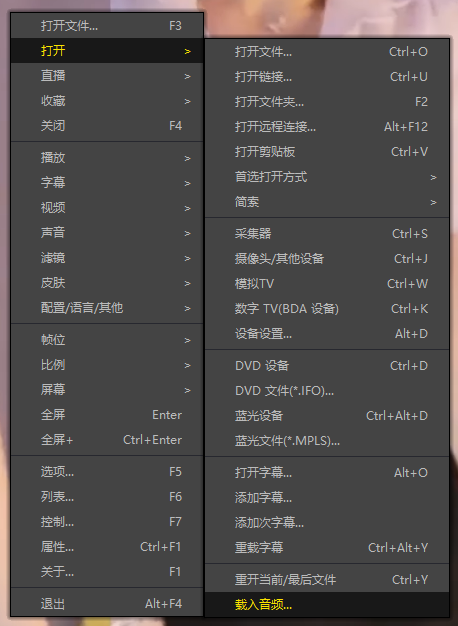
下载无声音的视频文件,并使用 PotPlayer (https://potplayer.daum.net) 打开视频,播放界面鼠标右键 -> 打开 -> 载入音频 -> 文件类型选择「所有文件(*.*)」 -> 选择下载的音频文件(例如xxx.weba),现在视频就有声音了,如下图。
方式二:使用 PotPlayer 合并视频音频播放

方式三:使用 FFmpeg 合并视频音频为一个文件

ffmpeg -i video.webm -i audio.weba -vcodec copy output.mp4

合成后的 output.mp4 将是有声音的

FFmpeg Download: https://ffmpeg.org/download.html

Windows: winget install ffmpeg

Mac: https://evermeet.cx/ffmpeg/