YouTube Video Search Download · No proxy required

Usage times: 2,642,486 Number of comments: 0
It's Fake 🤣☠️
It's Fake 🤣☠️

It's Fake 🤣☠️

Download Options

Fast download
Tips: Fast requires "Over the Great Firewall" Network
Only show audio

Download List

💥💥💥 Recommended to use IDM, can be accelerated by multiple threads, 🧧IDM software join group top self-pickup.
Quality FPS Format Audio Size Download VIP
1440p50 50 mp4 5MB
1440p50 50 webm 8MB
1080p50 50 mp4 5MB
1080p50 50 mp4 1MB
1080p50 50 webm 2MB
720p50 50 mp4 1MB
720p50 50 webm 1MB
720p50 50 mp4 3MB
480p 25 mp4 850KB
480p 25 mp4 671KB
480p 25 mp4 484KB
480p 25 webm 1MB
480p 25 webm 705KB
360p 25 mp4 369KB
360p 25 webm 280KB
360p 25 mp4 1015KB
360p 25 mp4 443KB
240p 25 mp4 128KB
240p 25 webm 148KB
240p 25 mp4 208KB
medium webm 202KB
medium m4a 220KB
low webm 87KB
low m4a 84KB
144p 25 mp4 98KB
❗❗❗ If you click Download to enter the preview page, you can try to right-click the download button to save the link as, right-click to use IDM to download.🧧IDM software join group top self-pickup
❗❗❗ For the problem that the video has no sound, you can download the video and audio separately and use the following methods to solve the problem 👇

Synthesize video and audio(YouTube uses separate video and audio storage)

Method 1: Use paid downloads of synthesized video and audio files

Scan the WeChat QR code to pay 1.99 (not 2.99) download synthesized audio and video files immediately

Method 2: Use PotPlayer to combine video and audio playback

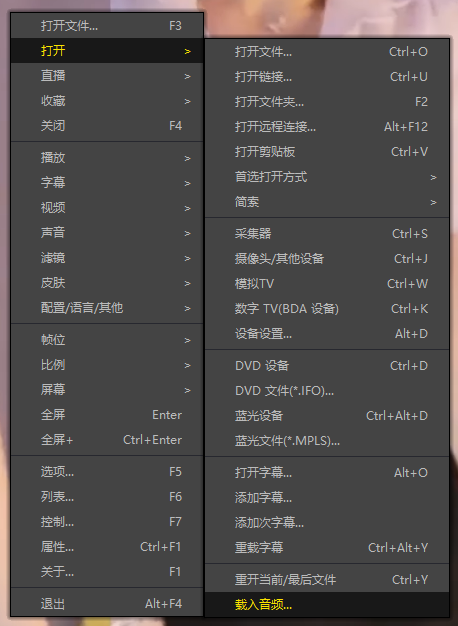
Download a video file without sound, and use PotPlayer (https://potplayer.daum.net) to open the video, right click on the playback interface -> Open -> Load External Audio -> File Type select "All Files (*.*)" -> Select the downloaded audio file (for example xxx.weba), now the video has sound, as shown below.
Method 2: Use PotPlayer to combine video and audio playback

Method 3: Use FFmpeg to combine video and audio into one file

ffmpeg -i video.webm -i audio.weba -vcodec copy output.mp4

The synthesized output.mp4 will have sound

FFmpeg Download: https://ffmpeg.org/download.html

Windows: winget install ffmpeg

Mac: https://evermeet.cx/ffmpeg/