
YouTube 视频搜索下载 · 全程无需科学

Secure your business with ThreatLocker today and sign up for Zero Trust World using our link: https://www.ztw.com and learn more about how ThreatLocker can help your business safely integrate AI agenic tools here: https://www.threatlocker.com/blog/applying-threatlocker-to-agentic-ai-tools Valve's new Steam Frame has finally arrived... no more leaks... and its promising to shake up the VR market. Is it the wireless, standalone headset we've been waiting for, or does it fall short of the high bar set by the Index? We test performance, battery life, and comfort to see if it's worth the upgrade. Discuss on the forum: https://linustechtips.com/topic/1642726-the-steam-frame-changes-everything-full-review/ Link to the Article about Human Vision referenced in the Video: https://pixelcraft.photo.blog/2022/05/16/the-human-visual-system-focus-and-acuity/ Check out our Channel Partners: Secretlab - Grab a TITAN Evo ergonomic gaming chair: https://lmg.gg/secretlabltt - Grab an ATLAS ergonomic office chair: https://lmg.gg/secretlablttatlas PIA - Get the VPN of our choice: https://www.piavpn.com/ltt dbrand - Buy a "Circuit" series skin for your device: https://dbrand.com/pcb ► SHOP LTT PRODUCTS: https://lttstore.com ► GET EXCLUSIVE CONTENT ON FLOATPLANE: https://lmg.gg/lttfloatplane ► DIVE DEEPER ON THE LTT LABS WEBSITE: https://lmg.gg/labs ► SPONSORS, AFFILIATES, AND PARTNERS: https://lmg.gg/partners Purchases made through some store links may provide some compensation to Linus Media Group. Affiliate links powered in part by https://affilimate.com/?aid=ghz1izbpb Linus Sebastian is an investor in Framework Computer, Inc and HexOS by Eshtek. CHAPTERS --------------------------------------------------- 0:00 Intro 2:15 What’s USING it like? 4:07 The MOST EXCITING Features 6:50 Standalone Functionality 9:35 Performance and Standalone Gaming Experience 10:55 Battery Life 12:51 Low Lights - Cameras and Controllers 14:55 Price and Free Form Discussion 23:32 Outro
下载选项
下载列表
合成视频和音频(YouTube使用分开的视频和音频存储方式)
方式一:使用付费下载合成好的视频和音频文件
1.99 (原价 方式二:使用 PotPlayer 合并视频音频播放
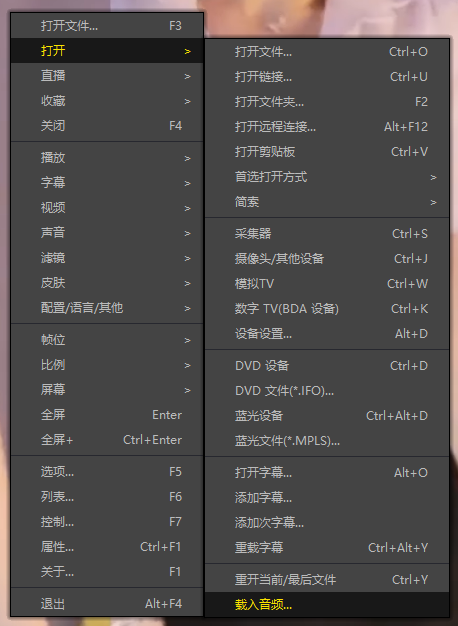
方式三:使用 FFmpeg 合并视频音频为一个文件
ffmpeg -i video.webm -i audio.weba -vcodec copy output.mp4
合成后的 output.mp4 将是有声音的
FFmpeg Download: https://ffmpeg.org/download.html
Windows: winget install ffmpeg