
YouTube 视频搜索下载 · 全程无需科学

After being banished from my kingdom, I ran hundreds of thousands of blocks out to create a new civilization... A civilization that would one day be strong enough to defeat my biggest enemy, Saparata. This is How I Built Minecraft's Most Advanced Civilization. Unstable SMP: ➜ @FlameFragsMC ➜ @Spokeishere ➜ @wemmbumc ➜ @ParrotX2 Like ParrotX2 and his Unstable SMP series, where he is escaping Paragon / Proton: Minecraft's Most Secure Prison, or got hunted by a Minecraft Player who doesn't exist. This is a new and original Minecraft idea like HermitCraft or Lifesteal with Wemmbu, FlameFrags, or Spoke. Survival is harder than Hardcore Minecraft because PVP is on. People in this video: @saparata @ClownPierce @HoraceMinecraft Yo thank you to all the people in trusted who helped with the montage you guys are goated. This is a video on the Unstable Universe: a staged Minecraft server where ParrotX2, Wemmbu, Spoke, and FlameFrags tell stories in Minecraft. A Minecraft video made by Parrot or ParrotX2 on other platforms! Enjoy!
下载选项
下载列表
合成视频和音频(YouTube使用分开的视频和音频存储方式)
方式一:使用付费下载合成好的视频和音频文件
1.99 (原价 方式二:使用 PotPlayer 合并视频音频播放
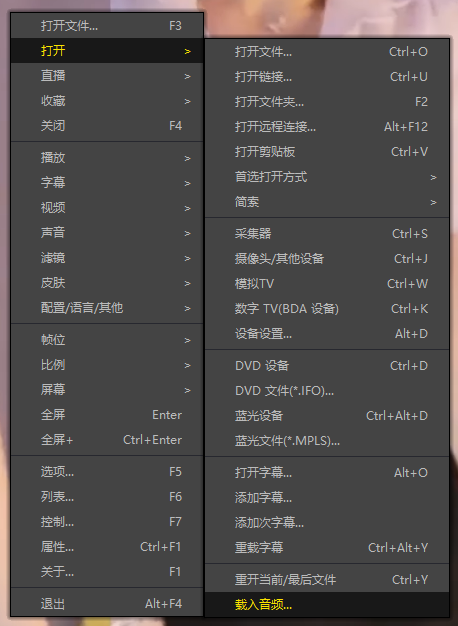
方式三:使用 FFmpeg 合并视频音频为一个文件
ffmpeg -i video.webm -i audio.weba -vcodec copy output.mp4
合成后的 output.mp4 将是有声音的
FFmpeg Download: https://ffmpeg.org/download.html
Windows: winget install ffmpeg